Showing posts with label Powerpoint.slideshows. Show all posts

Monday, 9 June 2014

The year we learnt to code


Hi everyone! 
Last week, on June 4th, we celebated the III Congress Ponte dos Brozos in Arteixo Innovación Building.
Many personalities from politics, culture and education, teachers and families were there. 
In the coffee break, people enjoyed the opportunity to see some of the projects and interacted with our students who showed their skills and had a great fun challenging the visitors.
The event was a great success!

This is our presentation "The year we learnt to code" about our project for 3rd Grade using Hopscotch


Thursday, 19 December 2013

One Hour of Code in the EFL classroom

Hi there! 
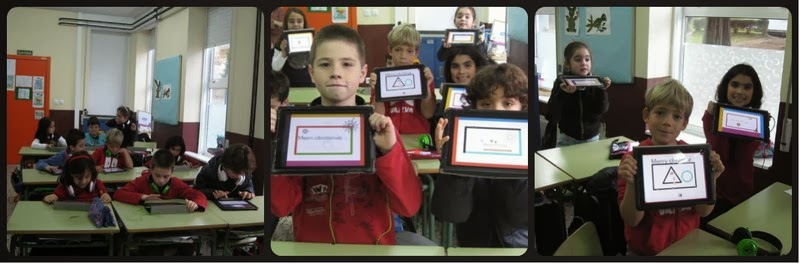
Third graders have learned an hour of code in the EFL classroom! 
After one hour of code, they could create their Christmas projects and they did it in English, of course! 
Here we are the next generation of computer Scientists!! 
Congratulations, kids!  You are coders now!

Merry Christmas and a Happy New Year!

Sunday, 20 January 2013

Add cartoon style to your photos


Hi, kids!
Phrase.it is a free online image editor which lets you add cartoon style speech and thought bubbles to your images.

  • There is no registration required.
  • Upload your image or use a photo from Phrase.it.
  • Use Phrase.it editor and write some text into the bubbles.
  • You can apply different filters to your picture: vintage, black and white...
  • Save and share or download it to your computer.
  • Post it on your blogs.

Sunday, 11 December 2011

Street Fashion


Hi, Fashion lovers!
Check the Sartorialtwist, a randon fashion generator that, every time you click the Refresh Button,  generates three slides to make a fashionable model. It's like a mix-up book!
Save your favourite street models and create a post or a slideshow. You can use Blogger, Google Docs or PhotoPeach.
Watch out! The Sartorialtwist is addictive!

* Class 5B and 5E: Create a Presentation at Google Docs.

More Resources at Topics for kids/Clothes

Sunday, 11 September 2011

Back to School Green Tips


View more presentations from Aurora.Jove.
Hi everyone! 
Summer holidays are over and it's school time again!
 The first day is always exciting because it's time to meet friends and teachers, time to have fun buying new school supplies but you must think you can go back to school without buying tons of new stuff. 
Think Green and remember the three R's of Reduce, Reuse, and Recycle. 

To learn more about how to go green when going back to school, have a look at my presentation.

Welcome back, kids. 
I wish you the best for this new School Year!

Monday, 2 June 2008

What's the weather like today? (For the 1st & 2nd Grade)


MUSIC BY:
Group: Portishead
Song: "Glory box"
Album: "Dummy"
Year: 1994
I have made this slideshow to talk about the weather in the classroom or at home with your family.
Don't forget to turn the music off when you want to speak. OK?
http://www.showbeyond.com/show/home

Monday, 19 May 2008

Let's upload our documents

If you want to publish your Powerpoint documents, Scribd.com is a very useful site where you can upload your slideshows or your Word documents and in seconds everybody can see and hear your stories. Then, you can copy the embed on your blogs and share with the World.
Register or sign up is necessary but kids, you can manage, can't you?
It is faster than Slideshare
Here you can see an example

Read this doc on Scribd: Picassso,Women's portraits

Sunday, 2 December 2007

THE TOWER OF HERCULES


*THE TOWER OF HERCULES, A CORUÑA, GALICIAN COAST.
Visit the Tower of Hercules (Roman lighthouse), Spain's official candidate for UNESCO World Heritage.

* The Tower website

Thursday, 14 June 2007

I'm publishing your slideshows! The link is on the sidebar!

ImageChef.com - Create custom images
Come on, kids!! Look at the girl's finger. She's pointing to the first link on the sidebar.There, I'm uploading your beautiful and interesting slideshows. Don't worry because I want to publish one slideshow for each pupil (all??? Impossible!!!) but it's a hard job and I need some extra time, sorry.
Now, go and have fun with your presentations.
Are you lost? Well, Here is the link, don't worry. Your slideshows are here.

* REMEMBER: Finish your work if you want to see your slideshows published

Wednesday, 6 June 2007

Your virtual teacher


As you can see this is me, but the virtual one.
Remember you have to finish all your electronic projects and your homework,too!!

Classes 4E and 4C: Two slideshows
  1. Animals and pets
  2. My week

Classes 6B and 6D: Three slideshows

  1. Europe
  2. Sports
  3. Animals
  4. London (For those who finish everything)

*Raymond, you can do it about Paris,of course! ...and don't sleep, please ;-)

Saturday, 12 May 2007

My week, a project for the 4th Grade


Hello, children! Here you are the job for this week. Ready, steady, GO!


Make a slideshow about one day in your week with three slides:
*One for the title and your name and class
*Another slide with title text and object about Tim.
* Slide number three is about one day in your week.Write about a free
activity or a sport you play or do. Almost write five sentences, please!

IMAGES: Google in English

SOUNDS:Free music

DICTIONARY: Trans 2.0


*Please, it´s very important you finish your English writing before giving effects or insert sounds and be elegant in your slideshow.
*Don't forget to save your job in the DOCENCIA folder,please!

Animals project for the 6th Grade


Hello, class! Here is your task about animals and pets:
  • Open a new Power point document and make a slideshow with four slides:
  • The first slide for the title and your profile
  • The second slide with title, text (almost with five little sentences) and object.
  • The third one with the same layout but about an animal that is not in your class book.
  • And finally the last slide for the dedications and the date.

*Remember that you only can use the sounds, effects and colors when you have finished the writing .

*Images: Flickr, google in English, Big Photo or Webshots

*Sounds and music: Free sound effects , Free music , Free animal sounds

*Dictionary: Trans 2.0 (This dictionary is so good that it hurts)

-Sure you have all those pages in your favourites???

If you have missed something go to INFOTECA - English files - Power point useful links folder and add them to your favourites.

*When you finish everything, save the document in the docencia folder, please.